
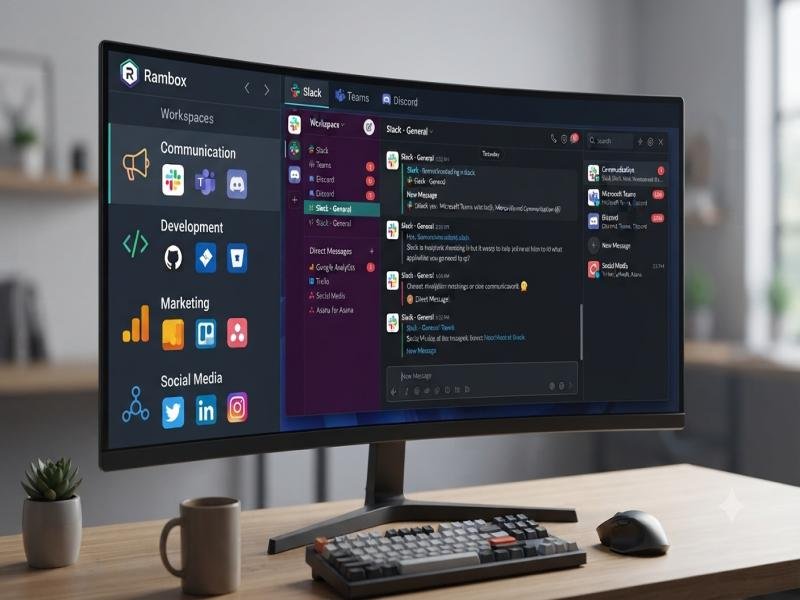
Rambox is a
productivity workspace that combines multiple web applications into one
organized desktop environment. It helps professionals and teams manage
communication tools business apps and daily workflows from a single platform.

Introduction to Rambox and Its
Digital Workspace Concept
Modern digital work often requires managing several
applications at the same time. Professionals may need email services
communication platforms project management tools customer support systems and
social networks throughout the day. Switching between multiple browser tabs can
create unnecessary distractions and make workflows harder to manage.
Rambox was created
to solve this challenge by bringing different web applications into one
centralized workspace. Instead of opening separate windows for every service
users can organize their favorite applications inside one desktop platform. The
goal of Rambox is to simplify digital organization
and provide a cleaner way to manage online tools.
Rambox is designed
for users who depend on multiple applications every day. It supports personal
productivity business communication remote work and professional collaboration.
The platform works as a digital control center where users can access different
services without constantly changing between browsers.
The growing popularity of cloud based services has created a
need for better application management. Many users now work with email
platforms messaging apps project tools cloud storage services and business
software at the same time. Rambox provides a
structured environment where these services can be grouped and managed
efficiently.
The platform supports hundreds of applications and allows
users to customize their workspace according to their needs. From communication
apps to productivity platforms Rambox provides
flexibility for different types of digital workflows.
Understanding the Rambox Product
Range and Platform Categories
Rambox is not a
traditional software product with physical accessories or hardware collections.
Its product range focuses on digital productivity solutions designed around
application management.
The main Rambox product
categories include.
• Rambox Personal
Edition for individual users who want better control over daily applications.
• Rambox Professional
solutions for users managing multiple accounts and business workflows.
• Rambox Enterprise
features for organizations that require centralized workspace management.
• Custom application support for adding websites and
services that are not already included in the platform.
• Workspace organization tools for arranging apps based on
projects tasks or personal preferences.
Each category focuses on improving digital organization and
reducing the complexity of managing multiple online services.
Rambox Core
Features and Workspace Design
The main strength of Rambox comes from
its workspace design. Instead of treating each application as a separate tool Rambox brings them together into one interface.
The platform allows users to add different services and open
them inside dedicated tabs. Each application maintains its own login session
which makes it easier to manage multiple accounts.
Important Rambox features
include.
• Multiple application management.
• Multiple account support.
• Custom workspace organization.
• Notification control.
• App grouping.
• Password protection options.
• Cross platform availability.
• Custom website integration.
The design approach focuses on simplicity. Users can create
a workspace that matches their daily activities. For example a freelancer may
create separate groups for client communication project management and personal
accounts. A business team may organize tools by department or workflow.
The interface is designed to reduce screen clutter. Instead
of having many browser windows open Rambox provides a
single location for managing important services.
Best Selling Rambox Features and
Popular Product Highlights
Although Rambox does not
sell physical products the platform has several popular features that represent
its most used solutions.
Rambox Application
Management System
The application management system is the foundation of the
platform. It allows users to connect different web based services inside one
workspace.
Users can add tools such as.
• Email applications.
• Messaging platforms.
• Collaboration services.
• Social media management tools.
• Customer support systems.
• Cloud based productivity applications.
The benefit of this feature is better organization. Users
can keep important tools available without searching through multiple browser
tabs.
Multiple Account Management
Many professionals handle more than one account for
different purposes. A social media manager may manage several business
profiles. A freelancer may communicate with multiple clients. A company
employee may use separate personal and professional accounts.
Rambox supports
multiple account management by allowing separate sessions for different
services.
This feature helps users.
• Separate personal and business activities.
• Manage multiple client accounts.
• Reduce repeated login processes.
• Keep different workflows organized.
The feature is especially useful for professionals who work
across different platforms throughout the day.
Workspace Customization
Every user has different digital habits. Rambox allows customization so users can build
a workspace that fits their needs.
Customization options include.
• Organizing apps into groups.
• Creating different workspaces.
• Adjusting application order.
• Managing notifications.
• Adding custom services.
A customized workspace improves daily productivity because
users can arrange tools according to importance and frequency of use.
Rambox Product
Comparison Table
Feature Personal
Workspace Professional Workspace Enterprise Workspace
Target Users Individual
users Professionals and teams Organizations
Application Management Available Advanced options Centralized management
Multiple Accounts Supported Enhanced support Team focused controls
Custom Applications Available Available Available
Workspace Organization Basic
customization Advanced organization Company level management
Security Options Standard
protection Additional controls Enterprise focused features
Rambox Design
Quality and User Experience
The design of a productivity platform plays an important
role in daily usability. Rambox focuses on
creating a clean environment where users can access many services without
unnecessary complexity.
The interface is built around organization rather than decoration.
The platform avoids overwhelming users with unnecessary elements and focuses on
quick access to applications.
The design benefits include.
• Simple navigation.
• Organized application panels.
• Easy switching between services.
• Reduced browser clutter.
• Better focus during work sessions.
A good productivity tool should save time instead of
creating additional management tasks. Rambox follows this
principle by keeping applications together in one structured environment.
How Rambox Supports
Modern Workflows
The way people work has changed significantly. Remote teams
freelancers entrepreneurs and digital professionals often depend on several
online tools every day.
Rambox supports
modern workflows by creating a central location for important services.
Common workflow examples include.
Remote Work Management
Remote workers often communicate through different
platforms. Rambox allows users to keep communication
tools accessible from one workspace.
Business Communication
Companies may use email chat collaboration and customer
service platforms simultaneously. Rambox helps
organize these services for easier access.
Freelance Work
Freelancers often manage different clients with different
communication channels. Separate workspaces can help maintain organization.
Personal Productivity
Individual users can combine personal email messaging and
productivity tools into one environment.